Log #3: What we do for love getting around CGNAT
I use cloudflare tunnels and tailscale[0] to get around my ISP’s CGNAT. It’s enough for the most part, but sometimes you really need that static IP.
When I torrent (totally legit material), I try to seed it for as long as I can. But, I can’t port-forward without a static IP, so the only peers I can connect to are those who can port-forward. This is perfectly okay and would be enough for most, but I’m big on giving back to the community so I want to reach all the peers I can.
Docker is amazing#
I started researching what I could do. My ISP does give me a global ipv6 address with a delegated /64 subnet. If I can assign an ipv6 address on this subnet to a docker container, my qbittorrent instance will become connectable for all peers that support ipv6.
Docker has two network drivers for this: ipvlan[1] and macvlan[2]. I tried IPvlan first. I created a new ipv6-only docker network and with the router’s subnet in ipam config.
services:
  qbittorrent:
    ...
    networks:
      hallways: {}    # default network that all containers use
      qb-ipvlan:
        ipv6_address: <subnet prefix>::1    # static ipv6 address
networks:
  ...
  hallways:
    external: true
  qb-ipvlan:
    driver: ipvlan
    enable_ipv6: true
    enable_ipv4: false    # ipv6 only
    driver_opts:
      parent: eno1        # host network interface
    ipam:
      config:
        - subnet: <subnet prefix>::/64    # router's subnet
          gateway: <router IP>            # router ipv6 address
This gave the container an ipv6 address on the subnet, but other containers on
the shared network hallways couldn’t reach the qbittorrent container anymore.
The container also published a port but it was no longer accessible on that
port from any device on my home network.
This is apparently a side-effect of how ipvlan works[3]. It might be possible to make the ipvlan setup work, but when I was researching the ipvlan issue, I found that macvlan might be more suited for my use-case. I didn’t get into the nitty-gritty differences between the two. That’s saved for another day. For now, I just went ahead with macvlan.
...
networks:
  qb-macvlan:
    driver: macvlan
    ...
This worked. qbittorrent container got an ipv6 address, and it didn’t mess up any networking. Finally, after I opened the port for incoming connections in the router firewall, qbittorrent started announcing to ipv6 peers.
It still doesn’t solve connectivity for ipv4 peers, but I knew I was gonna sleep better at night knowing that I’m seeding to more peers.
The morning after#
Sigh. ISP changed my ipv6 subnet prefix. Now, I need to:
- Get the new prefix
- Update the prefix in the gateway address and the container IP in the compose file
- Update the firewall rule on the router to allow connections to the new IP
- Recreate docker network and restart qbittorrent container
I do not want to do this every time my ipv6 prefix changes. Step 1, 2, and 4 are easily scriptable. For step 3, I had to lock in.
There’s no official API on the router. I opened the networks tab and captured
the firewall rule edit request. I can replay the request with curl in the bash
script, but the request authenticates with a cookie COOKIE_SESSION_KEY.
This cookie is short-lived so I can’t take one from browser session and use it in the script. To get a new session key, I have to see how login works. The login form sends a request with the following parameters:
{
    "Loginuser": "admin",
    "LoginPasswordValue": "<hashed value>",
    "LoginSidValue": "22efa25d"
}
Values of note are LoginPasswordValue and LoginSidValue. Looking at the
webpage script, the password is first url encoded and then hashed with the sid
value. The hashed password and the sid value are then sent in the request.
function submit()
{
	var sid = '22efa25d';
	var tempEncodePwdVal = encodeURIComponent(document.passWarning.LoginPassword.value).replace(/%[0-9A-F]{2}/g, match => match.toLowerCase());
	passwdHashed = hex_md5((tempEncodePwdVal)+":"+sid);
	...
}
The sid value is randomly generated and is also short lived because I tried making a curl request with a random sid value, and that did not work. So, I wrote a bash script to do the following:
- Get ipv6 prefix with
ip -6 addr - Update docker compose config
- Get the login page
- Parse sid value
- Hash password and sid
- Login
- Grab session key in response headers
- Edit firewall rule
- Docker compose up
AI disclosure
Although I keep a homelab because I enjoy hacking away at it and writing code, I do still use AI for tedious tasks like writing url encoding in bash.Run this script on cron and relax.
Simple enough[*].
*If only life was that simple#
The script works, but I noticed that my torrents were getting registered with either the ipv4 address or the ipv6 address. Now half my torrents were being seeded to ipv4 peers and the other half to ipv6 peers. Pfft. Unacceptable.
This is when I decided to run a second qbittorrent instance which will only bind to the ipv6 address, but this means that I need to mirror my torrents from the first instance to the second one without causing any file corruption.
qbittorrent has a REST API so I wrote a script that fetches all torrents from the source instance and adds them to the destination instance. The important thing to make sure was that only those torrents that have finished downloading are added to the latter so that they both don’t write to the same files.
As a safeguard, I also mounted the data directory as read-only on the ipv6 instance which makes it a strictly read-only seeding mirror.
  qbittorrent-ipv6:
    ...
    volumes:
      - "/data/torrents:/data/torrents:ro"    # readonly
    networks:
      - qb-macvlan

  qbittorrent:    # ipv4 only
    ...
    volumes:
      - "/data/torrents:/data/torrents"
Simplicity is the best city#
In the qbittorrent network settings, I noticed two ipv6 addresses (the third
one is link-local so it can be ignored) with the same subnet prefix. I only
assigned <prefix>::1. Where did that second address come from?
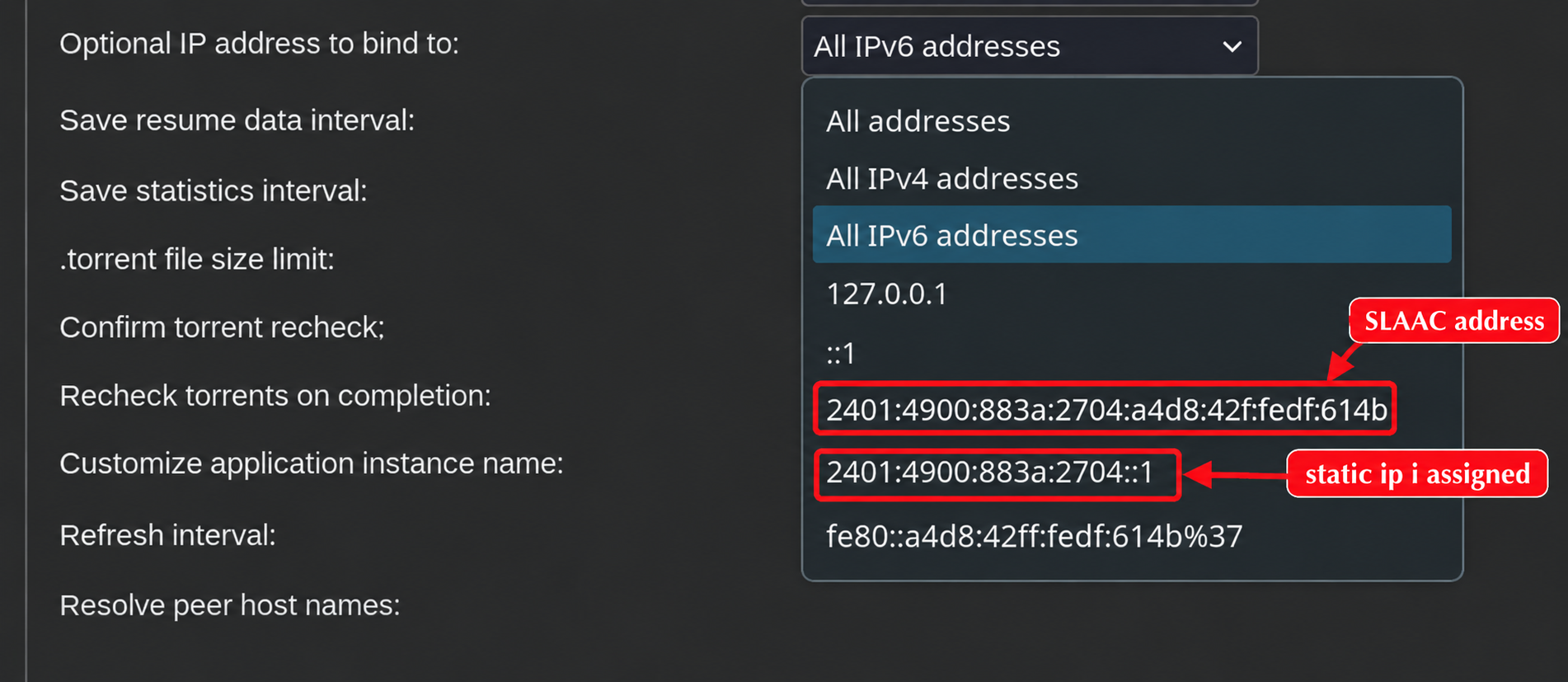
It turns out ipv6 has something called Stateless Address Autoconfiguration i.e. SLAAC[4]. Each device on an ipv6 network generates an address for itself. This means I don’t need to set the ipam config and assign a static address in the compose file.
services:
  qbittorrent-ipv6:
    ...
    networks:
      - qb-macvlan
networks:
  qb-macvlan:
    driver: macvlan
    enable_ipv6: true
    enable_ipv4: false
    driver_opts:
      parent: eno1
Nothing in the compose file now references the prefix, so there’s no need to run docker compose up or recreate the network and the container. The only thing left that goes stale is the firewall rule. The script collapses to:
- Read the container’s current address with
docker exec ... ip -6 addr - Router login
- Edit firewall rule
And that's it. One address to read, one rule to update, and now I'm seeding to almost 1.5x as many peers as before.
What did I learn?#
- Although surface level, I now know about ipvlan and macvlan drivers
- SLAAC
[0]: Log #0: Setting up Tailscale
[1]: https://docs.docker.com/engine/network/drivers/ipvlan/
[2]: https://docs.docker.com/engine/network/drivers/macvlan/
[3]: https://forums.docker.com/t/how-to-address-docker-container-via-hostname-ipvlan-adguard-unifi/140973
[4]: https://artofinfra.com/eli5/what-is-slaac-ipv6/